scroll to top
Located in Chatham, Illinois
Press enter or spacebar to select a desired language.

Computers & Printing

The Library offers free access to computers, internet, and popular software like Microsoft Office and Adobe Acrobat Pro. You can also print, copy, scan, and fax documents, or use our digitization tools to preserve your personal media. We even loan out a variety of equipment for two weeks at a time. Stop by and see everything available!

Computers | WIFI | Print, Copy & Scan | Fax | Laminator | Memory Lab | Microfilm Reader


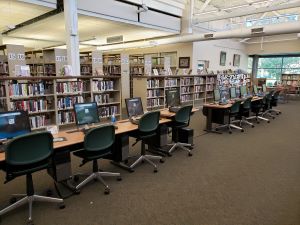
computers in the adult service area available for patron use

Computers

  • Computers are available on a first-come, first-served basis.  No time limit.
    • A limited number of headphones are available to borrow.
  • Internet Guest Cards are available for those that only want to use our public computers but don't have a library card. All users must agree to the terms of our Computer and Internet Acceptable Use Policy.

All of our computers have Microsoft Word, Excel, and PowerPoint, and select computers have Adobe Professional. 


WIFI

Free wireless internet is available for free throughout and around our buildings.

  • Connect to LibraryOpen on your device. --- No Password is needed
  • Accept the Terms of Agreement when prompted, either through a pop-up or after opening your browser.
  • You're online!

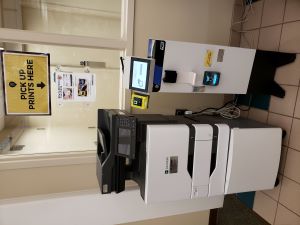
Printer and copy with kiosk to pay for prints

Print, Copy & Scan

The Library offers self-serve access to a black & white and color copy machine at the Adult Service desk.

Fees:

  • Black and white pages = $0.15 each side
  • Color pages = $0.25 each side

Credit cards and cash is accepted.

Scanning is also available for free at all locations.

How to send files to the Print Portal

  1. What do you want to print?
    1. Find one or more files on your computer or device that you want to print.
  2. Upload one or more files
    1. Click the link below and follow the on-screen instructions.
    2. Each file can be a maximum of 100 MB.  (If you are using an Android device and are unable to upload files through Chrome, please try another browser such as Firefox or Edge)

Go to the Online Print Portal

  1. How do you want to print it?
    1. Select number of copies, page range, greyscale or color and other settings.  (NOTE: The item waits in the library's printing system without being printed.)
  2. Go get your prints!
    1. Once your file is submitted, go to any library branch within 24 hours to print the file from a print kiosk. Staff can help you with this process.  After 48 hours print jobs are automatically deleted from the system.

How to Send Files by Email

You can send your files to be printed by email, instead of using the Web Portal.  The email message and any attached files will show up as separate files for printing at the library.  This method is a good way to remotely print an email message, or only the attached files.

Forward the email to one of the email addresses below:
Black and white: bw@chathamlib.org
Color: color@chathamlib.org
You will receive an email confirmation.
This displays the files to be printed and the Release Code required to print the files at the library.


Fax

The fax machine is located at the Circulation Desk.

Faxing is available to U.S. numbers only.

Outgoing Costs:

  • Toll-free & Sangamon County: FREE

  • Illinois (outside Sangamon County): $1/page

  • Out of state: $2/page

Incoming Faxes:

  • $1/page


Laminator

We have a laminator available for public use!

  • Laminate documents up to 11” x 17”
  • Cost: $0.50 per page
  • Ask at the Adult Services Desk for assistance.

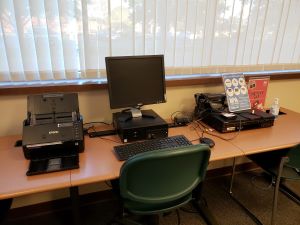
Computer with Epson Fastfoto and vhs attached to preserve memories

Memory Lab

Do you have boxes of old family photos, slides, or home movies gathering dust in the closet? Don't let those priceless moments fade away!

The Memory Lab is a dedicated space equipped with high-quality digitization tools designed to help you bring your past into the digital age.

How It Works: A DIY Space

The Memory Lab operates on a Do-It-Yourself (DIY) model.

We provide: The specialized equipment, software, and easy, step-by-step instructions.

You control: The entire process from start to finish, ensuring your private memories are handled exactly the way you want.

What You Can Digitize:

  • Photographs & Slides: High-resolution scanners to bring color and clarity back to old prints.
  • Home Movies: Equipment to convert aging video formats into modern, shareable digital files.
  • Documents: Preserve historical family certificates, letters, and scrapbooks.

💡 Tip: Bring a blank USB flash drive or have your cloud storage login ready so you can save your newly digitized memories!

Ready to get started?

Click here to learn more about the Memory Lab, view equipment specs, and book your session.


Microfilm Reader

A microfilm reader/printer is located in the Opal Lee Chatham History and Genealogy Room. You can save digital images to the computer, email or USB drives. Printing from the microfilm reader costs $.15/ side for black & white copies. Newspapers and other resources on microfilm can be requested from other libraries through Interlibrary loan (ILL). All you need to do to contact the Reference Librarians at reference@chathamlib.org or 217-483-2713.